




The trickiest business for modern parents would be balancing between giving their children freedom and restricting what should be omitted (for their health). Nowadays, all concerns gain digital polishing. What is Screen Time, and how can it help you manage your kid’s daily routine?
What Is Screen Time?
Unfortunately, even adults cannot always keep track of time. You cannot tell for sure where your minutes and seconds got left.

While offline (traditional :)) procrastination, as usual, goes hand-in-hand with our daily routine, the Internet is there to complete its triumph with an additional level of trash: discussions with total strangers in Facebook comments, purposeless scrolling of Instagram feed, never-ending Googling, Netflix with its eye-catching trailers — every time conveniently placed on your nightstand, blinking at you in temptation with its flash red eyes.
We all know the Internet helps us send our time down the pipe.
If we cannot always stop ourselves and set up a healthy daily routine, what do we want from our kids? 🤔
Kids & Internet Addiction

What parents are most concerned about is the inability of children to cut back on their screen time. The Internet certainly changes their cognition, memory, concentration, and the way they grow; the whole process is not reversible, as you might know. When it comes to time, children don’t understand its value, trading it for what frankly isn’t worth a minute.
But you remember how funny and fulfilling it was to spend evenings and nights out with your friends after school time. Sitting on the bench, hiding from neighbors, mocking each other in a funny, playful way. How addictive those lengthy discussions about life were, how entertaining and fun were the games, even if played for 33d times in a row…
Your kids are doing just the same, except the world is all digital now. They interact with each other, keeping up pace with trends, trying to disperse a drop of dopamine for their never-rested minds. And like every habit-forming drug, the Internet requires more and more time to derive the same pleasure.
What shall we do in order to keep our teens off screens?
Start with healthy limitations on their Screen time.
How to check screen time on Samsung or any other Android phone?
You can check Samsung Screen time as easily as any other Android device. Just follow the next steps:
- Go to Settings > Digital Wellbeing & Parental control.
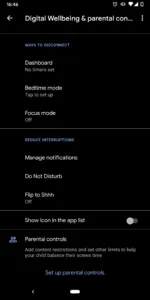
- Tap “Show your data.”
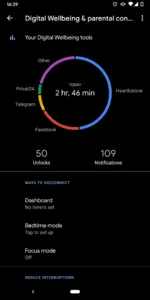
Here you’ll see the average time your child spends on different apps.
- Click on “Dashboard.”

Here you’ll find detailed information on how much time daily they spend on apps.
How to check screen time on an iPhone?
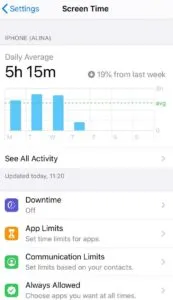
- Go to Settings > Screen Time.
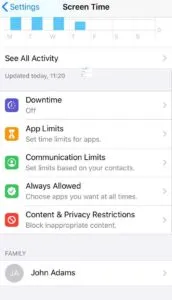
- Track the daily average and all activities.
How to limit screen time on your child’s phone
As a parent, you probably wonder how you can possibly prevent your child from being on the phone every single minute.
If they’re being cranky whenever you start a “digital well-being” conversation, then don’t get upset. They simply don’t understand that their habits are health destroyers. Filter and block inappropriate content and limit Screen time. When they find real relationships and develop new hobbies, they’ll gain peace with this.
How to limit screen time on an iPhone
If you’ve managed to get access to your child’s phone, you’re halfway there. Now, follow these instructions.
- Go to Settings > Screen Time
- Scroll down to “Use Screen Time Passcode”
- Set the “Screen Time Password”
- Go back to “Downtime”
- Enter the password you’ve created
- Enable Downtime and set up limits
Now your child won’t be able to bypass the downtime, as it’s protected by your password.
How to limit screen time on an Android
- Go to Settings > Digital Wellbeing & parental control
- Tap “Show you data”
- Go to “Dashboard”
- You can see the sand clock icons next to each column. Click on one of them.
- Here you can set up the timer for each app.
Parental Control for doubled measures
In an ideal world, your kid would obediently give away the phone/tablet whenever you ask and go doing homework with a big, not-at-all-fake smile on their face.
In reality, parents need to go the extra mile to convince kids to abandon their cell phones for at least a few minutes and “have that dinner”.
For this purpose and not only parental control apps also offer some top-notch features every parent should know about.
Some of the most popular monitoring apps for parents offer instant access to the kid’s phone aimed to extract information that may signal that the kid’s safety is at risk.
With such an app at hand, you can:
- Monitor your kid’s Internet activities
- Seamlessly limit the Screen Time on your phone
- Instantly monitor their social media accounts
- Tap into chats and messengers
- View their website history
While the Internet is becoming more of a “city with no adequate police control,” a parental control app is just an irreplaceable assistance for every modern parent. It allows you to make sure your child is protected and gets you information about their whereabouts every minute.
FAQ
If your child has an iPhone, do the following:
1. Go to Settings > Screen Time
2. Scroll down to “Use Screen Time Passcode”
3. Create a password that you’ll be using further to adjust settings
4. Re-enter Screen Time Password
5. Go back to “Downtime”
6. Enter the password you’ve created
7. Enable “Downtime”
8. Set up time limits and customize days if you wish.
If your child has an Android, do the following:
1. Go to Settings > Digital Wellbeing & parental control
2. Click on “show you data”
3. Click on “Dashboard”
4. Tap the sand clock item next to one of the column
5. Set up the timer for each app.
For an iPhone:
1. Go to Settings > Screen Time
2. Go to “Apple Limits”
3. Tap “App Limit”
4. Enter Screen Time Passcode
5. Choose the category you want to add a limit to (Social Networking, Games, Education, etc.)
6. Tap “next”
7. Set up maximum hours your kid can spend every day on it
8. Tap “Add”
For an Android:
1. Go to Settings > Digital Wellbeing & parental control
2. Click on “show you data”
3. Click on “Dashboard”
4. Tap the sand clock item next to one of the column
5. Set up the timer for each app.
The Common Sense Census suggests there are four categories of activities on the phone:
- Passive consumption (watching tv series)
- Interactive consumption (playing games)
- Communication (chatting, video-conferencing)
- Creation (making content using different tools)
Which of these should be limited is frankly a personalized question. Distinguishing healthy stuff from junk is not that hard: video-chatting with friends is better than killing 5 hours on Fortnite. Mind-stimulating games are ok while communicating with strangers carries a potential risk.
So, it’s better to decide based on your preferences, your kid’s age, and simple logic.

